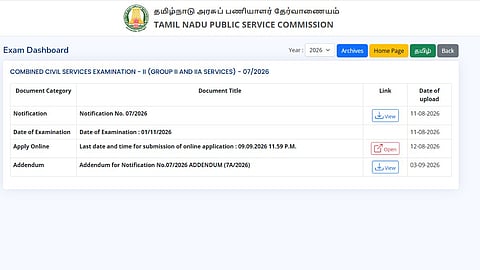


The Tamil Nadu Public Service Commission (TNPSC) is expected to activate the hall ticket download link for the Combined Civil Services Examination-II (Group II and IIA Services) preliminary examination soon.
The preliminary examination is scheduled for November 1, 2026. With less than two weeks remaining, candidates who applied for the recruitment examination are awaiting the release of their hall tickets.
However, the Commission has not announced an official release date for the TNPSC Group 2 Hall Ticket 2026. Candidates should check the TNPSC examination dashboard at tnpsc.gov.in for the latest updates.
Notification released: August 11, 2026
Application deadline: September 9, 2026
Hall ticket release date: Yet to be announced (as per previous years' trends, hall tickets usually released 10 days before the exam)
Preliminary examination: November 1, 2026
Exam timing: 9.30 AM to 12.30 PM
Once the download link is activated, eligible candidates will be able to access their hall tickets through the TNPSC website and the Commission's online examination portal.
The hall ticket, officially referred to as the Memorandum of Admission, will be available online. TNPSC does not send hall tickets to candidates by post.
Candidates should keep their application number and date of birth ready to access the document.
Visit the official website at tnpsc.gov.in.
Open the Examination Dashboard or Hall Ticket Download section.
Select the Combined Civil Services Examination-II (Group II and IIA Services) 2026 link.
Access the One Time Registration (OTR) dashboard.
Enter the required login details, including the application number and date of birth.
Download the hall ticket and take a printout for examination use.
The download facility will become available only after TNPSC activates the relevant link.
Candidates should verify their name, photograph, registration details, examination centre, reporting time and other instructions printed on the hall ticket.
Any discrepancy should be brought to the Commission's attention through its official channels.
Candidates should also carefully read the examination-day instructions, including the reporting requirements and restrictions on items permitted inside the examination centre.
