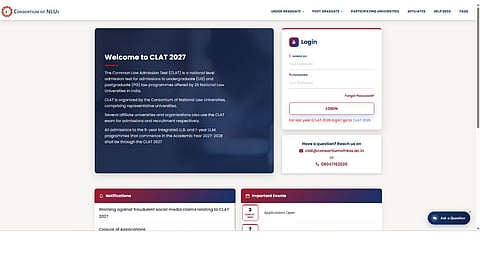


The Consortium of National Law Universities (NLUs) is expected to release the CLAT 2027 admit cards soon. Candidates who have registered for the Common Law Admission Test (CLAT) 2027 can download their hall tickets through the official website, consortiumofnlus.ac.in, once the link is activated.
The Consortium has not yet confirmed the admit card release date or time. The examination is scheduled for December 6, 2026, from 2 pm to 4 pm, for admission to undergraduate and postgraduate law programmes offered by participating NLUs.
Candidates will need their registered mobile number and password to access the CLAT 2027 candidate dashboard and download their admit cards. If you have forgotten your login password, you can use the 'Forgot Password' option on the official portal to reset it.
Candidates who are unable to access their CLAT 2027 accounts can follow these steps:
Visit the official website at consortiumofnlus.ac.in/clat-2027/.
Click on the 'Forgot Password?' option available below the login fields.
A 'Request for OTP' window will appear on the screen.
Enter the mobile number used during CLAT 2027 registration.
Click on the 'Request OTP' button.
Enter the OTP received on the registered mobile number and proceed with the password reset process.
Create a new password as instructed on the portal.
Return to the candidate login page and sign in using the registered mobile number and new password.
Candidates who remember their login credentials can directly access the dashboard without resetting their passwords.
Once the admit card link is activated, candidates can follow these steps:
Visit consortiumofnlus.ac.in/clat-2027/.
Enter the registered mobile number and password.
Click on the 'Login' button.
Select the CLAT 2027 admit card link from the candidate dashboard.
Verify the examination centre, reporting time and other details.
Download and print the admit card for the examination.
Candidates must check the details mentioned on their hall tickets carefully. In case of discrepancies or difficulties accessing their accounts, they can contact the Consortium's helpdesk at clat@consortiumofnlus.ac.in or 08047162020.
The CLAT 2027 examination will be conducted offline, in pen-and-paper mode on December 6. Candidates are advised to keep their login credentials ready and regularly check the official website for the admit card release announcement.